Scenes
A Scene contains all the objects to be rendered. It manages collections of renderables and light sources.
Renderables are objects that can be rendered by the engine, such as models, terrain, particle systems, or skyboxes.
Light sources illuminate renderables in the scene.
Cameras determines the perspective from which a scene is viewed. They define the position, orientation, and projection parameters.
A View represents a viewport with a specific scene and camera. The view handles rendering and can apply PostShaders to the final output. Multiple views can render the same scene with different cameras.
graph TD
    Scene -- contains --> Renderables
    Scene -- contains --> LightSources
    View -- shows --> Scene
    View -- uses --> Camera
Coordinate system
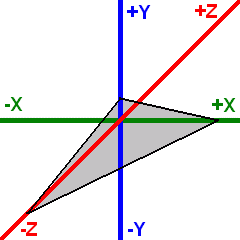
OmegaEngine uses a left-handed coordinate system (as used by DirectX) with the following default orientation:
- Positive X axis - Points to the right
- Positive Y axis - Points upward
- Positive Z axis - Points into the screen (away from the viewer)
The standard camera orientation is a view along the negative Z axis, looking into the positive Z direction.
Setup
Basic example of setting up a scene with a model and lighting:
var scene = new Scene
{
    Positionables =
    {
        new Model(XMesh.Get(engine, "MyModel.x"))
    },
    Lights =
    {
        new DirectionalLight { Direction = new(-1, -1, 1), Diffuse = Color.White }
    }
};

var camera = new FreeFlyCamera
{
    Position = new(0, 10, -20)
};

var view = new View(scene, camera) { Lighting = true };
engine.Views.Add(view);
Render hierarchy
Positionables holds the roots of the scene. Every PositionableRenderable in turn has a Children collection, so renderables can be grouped under a shared transform.
A root's Position is absolute world space, a child's Position is an offset in its parent's coordinate system. WorldPosition always gives the absolute position.
scene.Positionables.Add(new Model(XMesh.Get(engine, "Spaceship.x"))
{
    Position = new(0, 0, 100),
    Children =
    {
        new Model(XMesh.Get(engine, "Engine.x")) { Position = new(0, 0, -5) }
    }
});
Pivot is a renderable without geometry meant purely for grouping.
scene.Positionables.Add(new Pivot
{
    Position = new(0, 0, 100),
    Children =
    {
        new Model(XMesh.Get(engine, "Hull.x")),
        new Model(XMesh.Get(engine, "Engine.x")) { Position = new(0, 0, -5) }
    }
});
Adding a renderable to a collection removes it from its previous one and keeps its local Position, Rotation, Scale and PreTransform, i.e. its world position changes to match the new parent.
Rotation, scale and PreTransform are inherited in full, so non-uniform scaling on a parent combined with a rotated child produces shear.
Setting Visible = false on a renderable hides it together with its entire subtree.
Billboard, ForcedPerspectiveDistance and AutoScaleDistance are per-view effects applied to leaf nodes only; they have no effect while a renderable has children.
PointLight and Sound3D can follow a renderable instead of holding an absolute position: set AttachedTo and give them a local Offset.