Terrain
OmegaEngine supports heightmap-based terrain rendering with multiple blended surface textures and pre-calculated self-shadowing.

The Terrain class renders heightmap-based terrains.
AlphaFramework.World.Terrains provides tools for terrain generation, editing, and storage.
Height map
The height map is a 2D grid of elevation values that defines the terrain's shape. Each value in the grid represents the elevation at that specific location on the terrain. Height maps are stored as byte grids (values 0-255). The horizontal scale of each sample is controlled by StretchH, and the vertical (elevation) scale is controlled by StretchV. Terrain dimensions must be multiples of 3.
In AlphaFramework, the height map is accessed via HeightMap. The data is typically loaded from external files for efficient storage.
Textures
The texture map defines which texture to use at each location on the terrain. Multiple textures can be blended together to create smooth transitions between different terrain types (e.g., grass, rock, sand).
AlphaFramework uses texture templates to map texture indices to actual textures. The TextureMap stores indices that reference these templates, allowing efficient reuse of texture definitions across the terrain. The texture map is stored at 1/3 the resolution of the height map: each texture cell covers a 3×3 block of height map samples.
When DetailMapping is enabled, terrain textures are sampled twice with different texture coordinates and blended together. This technique provides better image quality by reducing repetitive tiling patterns that can occur when the same texture is repeated across large terrain areas.
Shadowing
The occlusion interval map provides pre-calculated self-shadowing data. This map stores information about which parts of the terrain cast shadows on other parts, based on the terrain's geometry. This approach allows for efficient rendering of terrain shadows without real-time shadow calculations.
The OcclusionIntervalMap can be generated using OcclusionIntervalMapGenerator.
Coordinates
Terrain data uses a 2D coordinate system for heightmap and texture data. This coordinate system is directed right-downwards (as used in graphics files).
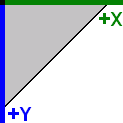
These 2D coordinates map to the 3D engine coordinate system:
| Axis | Terrain Dimension |
|---|---|
| Positive X axis | Width of the terrain |
| Positive Y axis | Height of the terrain |
| Negative Z axis | Depth of the terrain |